

Contents
This is the fourth part of a series of articles exploring the Allocate Services action found in the Invoices application. In the first part we saw the Allocate Service action being used across a set of four storeroom materials and we used the Prorate button. In the second part we found out that the allocation of Standard Services with the Prorate Service field set could be automatically achieved without using the Allocate Services action, simply by approving the invoice. The automatic allocation of services is restricted to material items and service items receive no part of the prorated services.
In the third article we explored the Allocate Service action in more detail, showing that you could have multiple standard services to allocate and to allocate those services to some and not all the other invoice lines. An invoice line might receive its Prorated Cost from multiple standard services.
In this article I want to show:
- You can allocate a Standard Service with Prorate Service set against other services that do not have Prorate Service set. We will allocate $200 of LEGAL fees, against both a standard service and a PO with line type Service.
- You can allocate a Standard Service against purchase order lines that have no quantities only a cost.
- We will also see whether you can allocate a Standard Service against other PO lines that have already been received. For example, you receive an additional $200 of LEGAL fees.
- We will see whether you can partially allocate a Standard Service, I expect the answer will be no, but we will see.
- We will see what happens if the Total Service to Allocate and the Total Services Allocated are not equal when you use the OK button.
- We will also review how to remove a previous allocation of a Standard Service.
The focus of this article is using the Allocate Service function against services rather than materials. Remember you cannot automatically allocate a Standard Service to other services just by approving the invoice, for services you must use the action Allocate Services.
Allocate Service to PO Lines of type Service or Standard Service
Purchase Orders

I’ve created a new PO 1105 with three service lines, none of which have a quantity or unit cost only a line cost.
- Line 1 has standard service LEGAL for $200 with Prorate Service set, this is the line we will allocate to the other two service lines.
- Line 2 has standard service GROUNDS for $400, Prorate Service is not set
- Line 3 has a line type of Service, with description – Car park white lining – also for $400, Prorate Service is not set.
Conveniently, the net total adds up to $1000.
We will not receive these services, we will go straight to the Invoices application. But first we need to make sure each line has a GL Debit Account before we approve the PO.
Invoices

I’ve created a new invoice 1081 and referenced PO 1105 on the invoice header. After saving, on the Invoice Lines tab I’ve used the table window action Copy PO Lines and will copy all three PO lines to create invoice lines.

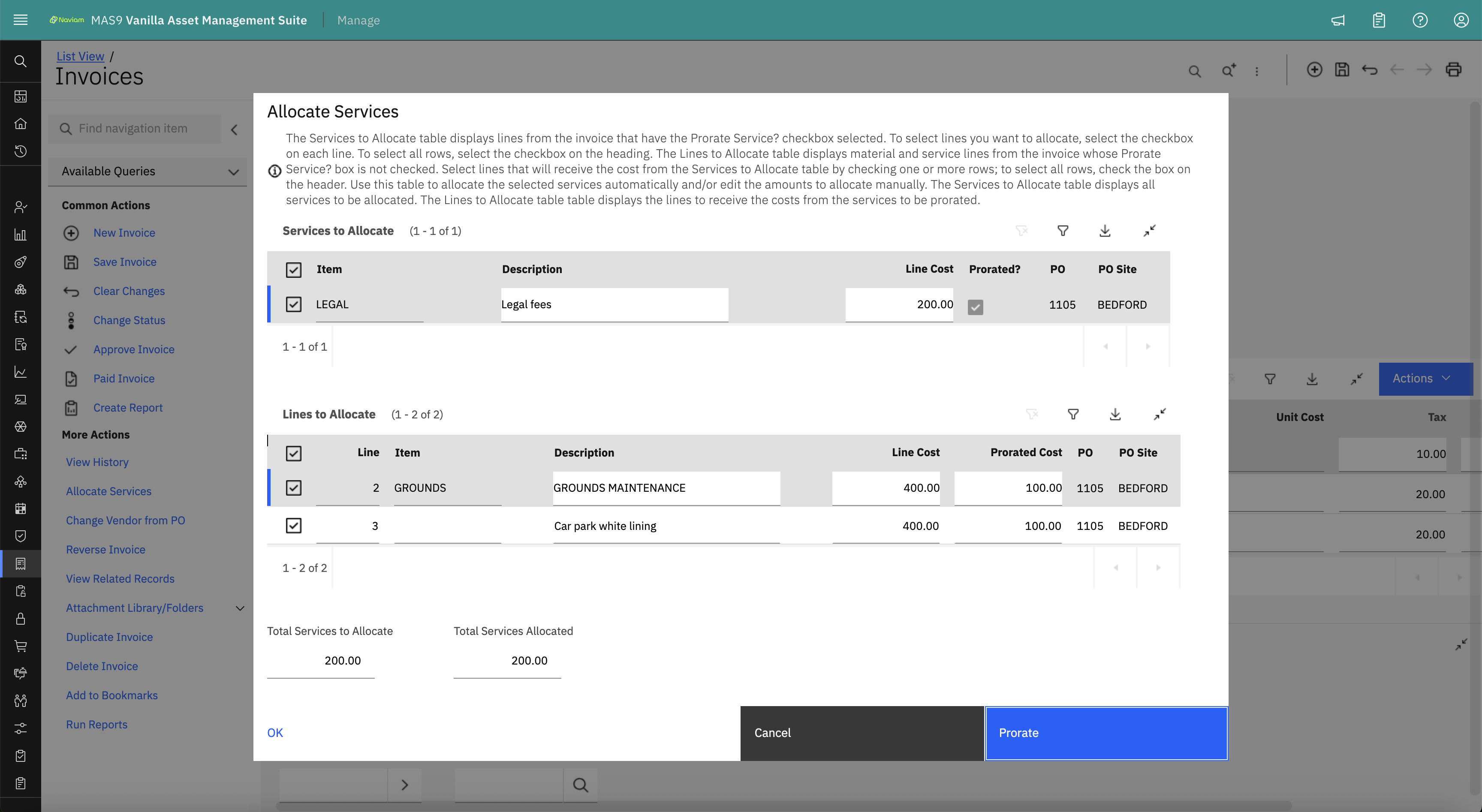
In the Allocate Services dialog the LEGAL standard service with Prorate Service set appears in the Services to Allocate table window, I’ve selected it. The other two invoice lines appear in the Lines to Allocate table window, and I have selected both, they are also services, but their Prorate Service is not set.

I’ve now used the blue Prorate button and the LEGAL standard service of $200 has been equally allocated to the other two service lines, their Prorated Cost are each $100.00.
As Total Services to Allocate is equal to Total Services Allocated we can use the OK button.

The Invoice Lines now show the changed Loaded Cost and Prorated Cost:
- LEGAL Loaded Cost is now $0 and Prorated Cost is -$200. This was the line that was prorated.
- GROUNDS Loaded Cost is now $500 and Prorated Cost is $100. It received half of the financial allocation from LEGAL.
- Car park white lining, the PO line of line type Service also has a Loaded Cost of $500 and a Prorated Cost of $100. This invoice line received the other half of the financial allocation from LEGAL.
The invoice has now been approved illustrating that the Allocate Services action can be used to prorate a standard service across other PO lines that can include services, both line types of Standard Service and Service. This is possible using the Allocate Services action but is not possible without using this action, i.e. by automatically allocating service during invoice approval, that only works for prorating to material lines.
There were no surprises when reviewing the purchase order in the Receiving application. There were three Service Receipt (SERVRECTRANS) transactions one for each invoice line, each with an Issue Type of INVOICE.
In the next few tests we will try and establish the boundaries of what is possible with Allocate Services.
Allocate Additional Standard Service Costs

What if you later received an additional invoice for legal fees?
I’ve created a new invoice 1082 against the same PO 1105. I’ve added two invoice lines using the Copy PO Lines table window action. In both cases the Quantity is null for the GROUNDS Standard Service the Line Cost is $0; we have already received the invoice for the GROUNDS service.

You need at least one invoice line with a standard service with Prorate Service set for there to be a row in the Services to Allocate table window of the Allocate Services dialog.
You need at least one other invoice line for it to appear in the Lines to Allocate table window of the Allocate Services dialog.

I’ve selected both rows in the Allocate Services dialog and used the blue Prorate button and received the error – BMXAA7913E – Cannot allocate services because the line item cost on invoice line 2 is 0.
The Line Cost is $0.00 because there is no remaining uninvoiced cost for PO 1105 Line 2, the GROUNDS item.
I did raise an IBM Support ticket for this, and the answer came back that you cannot use the Prorate button against an invoice line where the Line Cost is $0, this is how it has been designed. You can manually allocate to an invoice line with zero Line Cost, and we will show manual allocations a little later.

The Allocate Services dialog allows you to modify the Line Cost for the GROUNDS item, I’ve changed it to $10.00 and this has allowed me to use the blue Prorate button.

After using the OK button and closing the Allocate Services dialog, the Line Cost, Prorated Cost and Loaded Cost of both invoice lines was as expected. The Line Cost of the GROUNDS item is $10; Prorated Cost is $100 and Loaded Cost is the sum of the two $110.
Notice it is possible to change the Line Cost of the invoice line back to zero, which presumably would avoid any service receipt tolerance issues. I’ll leave it at $10 because I want to see what happens when approving the invoice.

When approving the invoice I did receive an error, not the error I was expecting.
BMXAA2013E – Could not change invoice 1082 status to APPR.
BMXAA1993E – Cannot approve invoice 1082 because there are no matching receipts for line 1 of purchase order 1105.
PO Line 1 is the LEGAL item with Prorate Service set, it does not have Receipts Required set. While the message is unexpected, it is clearly trying to match to a PO line. I raised an IBM Support case for this and eventually we tracked down the cause of the issue which is that the Receipts Complete on PO Line 1 of PO 1105 is marked as complete (=1). If you remember in the first scenario, we invoiced the full amount against all three PO lines and while we had not received those lines Maximo behind the scenes created the Service Receipts when the invoice was approved. The creation of those Service Receipts of Issue Type INVOICE is enough to have set all three PO lines to Receipts Complete.
As part of reviewing the IBM Support case I discovered that if you partially receive on the first invoice, then the second invoice allows you to over receive, this is because the Receipts Complete is not set after the first invoice.
What I learnt from this error is that you need to consider whether to include Standard Services that will be prorated on the PO. If you do not include them on the PO and just enter the Standard Services on an invoice line, then no match will be attempted, and the error will not occur. We’ll try this.
I’ve cancelled invoice 1082 and raised a new one, this time I will use the New Row button to add a LEGAL standard service rather than using the Copy PO Lines action.

I’ve created a new invoice 1083 against PO 1105 with two invoice lines. The first invoice line is using Standard Service LEGAL, but I used the New Row button and not the Copy PO Lines action, notice in the Related Records section the PO Line field is blank. I will see if I can allocate $200 to the PO line for the GROUNDS item, PO Line 2.

In the Allocate Services dialog I have selected the LEGAL fees to allocate $200 to Invoice Line 2, the GROUNDS item. As before I had to make the Line Cost a positive value and chose $10.00. This allowed me to use the blue Prorate button and then the OK button to close the dialog.

After the Allocate Services dialog closed, I tried to reduce the Line Cost of the GROUNDS item to $0.00 and received the warning message – One or more costs is being changed after allocating prorated services which may result in an incorrect allocation to this line. If you proceed, you should consider repeating the Allocate Service process. Do you wish to continue? (BMXAA5994) – the options are Yes or No, and I chose Yes.
Now I have a GROUNDS invoice line with zero Line Cost but a Prorated Cost of $200 which has come from the additional LEGAL standard service, invoice line 1, which did not reference a PO line. I needed to enter a GL Debit Account for the LEGAL invoice line, then I tried to approve the Invoice, and it accepted it.
Note. Much later I noticed that the Loaded Cost was $0 which is incorrect and I wondered whether this was the cause of not receiving the additional service receipt. In another test I changed the Prorated Cost to $210, saved and changed it back to $200 so that the Loaded Cost was $200. It did not make a difference I did not get the Service Receipt for the GROUNDS item, I just received another SERVRECTRANS record for the LEGAL standard service.
Receiving

When I went to check in the Receiving application for the Service Receipts there was only one additional line for the Legal Fees. It referenced invoice 1083 and had a Line Cost of $200 and a Loaded Cost of $0, which is correct it has been Prorated to the Grounds item, but there was no additional Service Receipt for PO Line 2 the GROUNDS item.
The total Line Cost for the PO is now $1200 but the Loaded Cost is $1000. This is incorrect, if Maximo has allocated the Standard Service there must be a corresponding material or service receipt with a Prorated Cost to match it. An IBM Support case has been raised.
I did follow-up with quite a bit more testing around this area, and it seems things go astray when changing the Line Cost back to $0 which would make it a bit obscure.
What I am beginning to sense is that the Allocate Service function has been designed around the freight or other Standard Service charge occurring at the same time as the invoice for the receipt of the items. If you subsequently receive an invoice for a Standard Service then you must have other invoice lines to distribute those costs, but those lines should have a null quantity and a zero-line cost. Maximo doesn’t handle that situation, you can get close, but as it doesn’t handle it naturally, you will find issues.
IBM have suggested that you reverse the original approved invoice and add the standard service to it before using Allocate Services and approving the invoice. This has potential but is not a complete solution and I wonder, what happens if some of the storeroom quantity has already been issued, what if the direct issue materials are now on a closed work order. You may also have received multiple invoices for your receipts; do you reverse each one and try and figure out how much should be allocated to each invoice?
Incidentally the business scenario that I am looking into is the receipt of a freight invoice that references multiple purchase orders where the goods have already been received and invoiced. Maximo Allocate Service function looks to be a partial fit but not a full fit for this business case. The freight charges are being clubbed together to reduce the administration costs to both parties from handling many additional invoices. I have raised an IBM Idea for this – https://ideas.ibm.com/ideas/MASM-I-1739
Changing the Line Cost in Services to Allocate
Receiving

I have created a new Purchase Order 1108 with two storeroom items ITEM01 and ITEM02 with quantities 4 and 1 respectively. The PO was approved. In the Receiving application I have used the table action Select Ordered Items and received a quantity of 2 of ITEM01 and quantity 1 of ITEM02. The Receipt Status is PARTIAL and Received Cost is $140 of the net PO total of $200. ITEM01 unit price is $30 and ITEM02 unit price is $80.
Invoices

In the Invoices application I have created a new invoice against PO 1108 entered on the Invoice header, and on the Invoice Lines used the table action Copy PO Lines, but we are using the Materials tab to select the received items ready for invoicing.

I’ve now added a FREIGHT Standard Service of $100 to the invoice and we are ready to prorate these services using the Allocate Services action.

I had noticed when using the Allocate Services action that you could change the Line Cost field in the Services to Allocate table and I wanted to explore this. I’ve changed the Line Cost for FREIGHT Standard Service to $50, selected it and selected the two items in the Lines to Allocate table. One thing I have noticed is that the Total Services to Allocate has not reduced to $50 it is still $100. I have reported this to IBM Support.
Note. I can’t see why you would want to change the Line Cost in the Services to Allocate table, if there was a reason to split the FREIGHT into two lines of $50 you would do this before using the action.

I’ve now used the blue Prorate button and the $50 has been split across the other two invoice lines for ITEM01 and ITEM02 using the Line Cost as the prorate basis. Notice in the Service to Allocate table the Prorated field is now set.
If you tried to use the OK button, you would receive the error BMXAA1969E – The total of the service lines to be allocated is not equal to the amount allocated.
To save the allocated services the two totals, Total Services to Allocate and Total Services Allocated, must be the same, therefore if you change the Line Cost in the Services to Allocate table window, unless there were multiple rows in this table you wouldn’t be able to leave the dialog except by using the Cancel button.
As the Total Services to Allocate is not currently updated when the Line Cost in the Service to Allocate table is changed you should not change this field, you will not be able to leave the dialog without cancelling.

I’ve changed the Line Cost for the FREIGHT item back to $100; I did receive an information message – You are changing the cost of a prorated service which will cause previous allocations to be incorrect. Do you wish to continue? (BMXAA5993) with buttons for Yes and No. I chose Yes.
It would have been better to use the Cancel button and then use the Allocate Services action again.
If you try to use the Prorate button again you will receive warning – BMXAA1954W – The service amount has already been prorated. Manually edit the allocated amounts or click OK to leave the page. You wouldn’t be able to use the OK button because the totals are not equal, but you can manually change the Prorated Cost across the Lines to Allocate table.
This is all logical, but it does feel as if you are a bit stuck in the dialog. If the Total Service to Allocate was updated when you changed the Line Cost of the Standard Service then I think things would feel more normalised.

I’ve manually changed the Prorated Cost, ITEM01 $40 and ITEM02 $60 for a total of $100. The two totals are now equal, and you can now use the OK button.
Remove Allocated Service

If you go to use the Allocate Services action after lines have been Prorated, then you will receive the warning – BMXAA2030W – Invoice lines have already been allocated. Click OK to erase previous allocations and reallocate them.

When the Allocate Services dialog opens the FREIGHT Item is no longer Prorated and the Prorated Cost on the two Invoice Lines for ITEM01 and ITEM02 are zero. It certainly looks as if the previous prorated costs have been removed. However, you can only leave the dialog by either making a different allocation or using the Cancel button which doesn’t perform a save, hence the previous prorated costs will still be found.
You cannot remove Allocated Cost and return to a situation where the Allocate Service action had never been used, the reason for this is because to use the OK button the two totals must be the same. I have also reported this to IBM Support and suggested that if Prorated is null and Prorated Cost is zero on all Lines to Allocate then the OK button can be used to save the change even if the two Totals are not the same.
Distribute Costs

I was wondering what would happen if Distribute Costs had been used. When you go to use the OK button, you will receive the error BMXAA1989E – Multiple lines of invoice cost exist for prorate service invoice line 3.0. You receive the same error if you had started with the Distribute Costs and then used the Allocate Services action.
Allocate Services and Distribute Costs do not work together for the Standard Service which you are prorating across other invoice lines. That makes sense because it is likely that the Standard Services with Prorate Service set will be using GL Control Accounts; after allocation, the Loaded Cost will be reduced to zero, so you wouldn’t want to spread zero costs across multiple control accounts.

If you were wondering where the GL Account is set for the Standard Service, it is in the Service Items application and Service Item/Organization Details dialog. The GL Account 6800-990-000 is defaulted onto the Invoice Line when the Standard Service FREIGHT is used.
Manual Allocation
I wanted to do a further test on manual allocation, I think I found another issue, we’ll see.
Purchase Orders

I’ve created a new PO 1116 with one storeroom item, ITEM11, quantity 10 and line cost $300. I’ve then approved the PO.
Receiving

In the Receiving application and Material Receipts tab I’ve used Select Ordered Items table action, selected ITEM 11 and received quantity 10. As there is no need for an inspection the Inspection Status has moved to COMP (Complete).
Invoices

I’ve created an invoice 1110 for PO 1116 and used the Copy PO Lines table action to create invoice line 1 for ITEM11. I’ve then used the New Row button to add the Standard Service for FREIGHT with no quantity and a Line Cost of $100.

When using the Allocate Services action the FREIGHT item appears in the Services to Allocate table and ITEM11 appears in the Lines to Allocate action. I have not used the Prorate button, but I have manually entered the Prorated Cost of $100.
Notice the Prorated field has not been set, it is read-only, you cannot change it manually.
You can use the OK button to save the changes and close the dialog. Everything on Invoice Line 1 is OK, Line Cost $300, Prorated Cost $100 and Loaded Cost $400.
For Invoice Line 2 the FREIGHT Standard Service, Line Cost is $100, Prorated Cost is $0 and Loaded Cost is $100. The Prorated field is still not set. This has been reported to IBM Support as you have Prorated Costs on Invoice Line 2 but the Standard Service has not yet been prorated.
Further if you approve the invoice, the FREIGHT Standard Service is now marked as Prorated with Line Costs $100, Prorated Cost of -$100 and Loaded Cost of $0 – all OK. However, invoice line 1 now has a Loaded Cost of $500 with Line Cost $300 and Prorated Cost of $100. The Loaded Cost should be $400. This was reported as part of the same issue to IBM Support.
Manual allocation of services is a feature that was designed into the Invoices application, but it seems that the Prorated field is not being set when you do this, and as a result the Prorated Cost and Loaded Cost of the standard service is not being calculated correctly when you save and leave the Allocated Services dialog. If it were, then I think the issue on invoice approval would not exist. I was right to think that another issue had been found.