
-

Crew Assignment Status (1) – Required Crafts
Read more: Crew Assignment Status (1) – Required CraftsWhen you make labor and tool assignments to crews you will want to verify the assignments meet the requirements of the crew on a particular day in which the crew is due to go out. There is an action Crew Assignment Status that opens a dialog with 5 table windows, three of which provide a…
-

Labor
Read more: LaborContents A Labor record must reference a Person record but we will see later that you can create a Person record from the Labor application. But why do we have both in Maximo? A Labor record is used with work order assignments, a labor may be assigned to a crew position, so a Labor record…
-

Crews (2 of 3) – Crew Work Groups
Read more: Crews (2 of 3) – Crew Work GroupsCrew Work Groups are used to limit what crews can be assigned to work; a crew can belong to a crew work group. A work order can inherit its crew work group from a Preventive Maintenance record or a Job Plan and when you make an assignment the available crews are those that belong to…
-
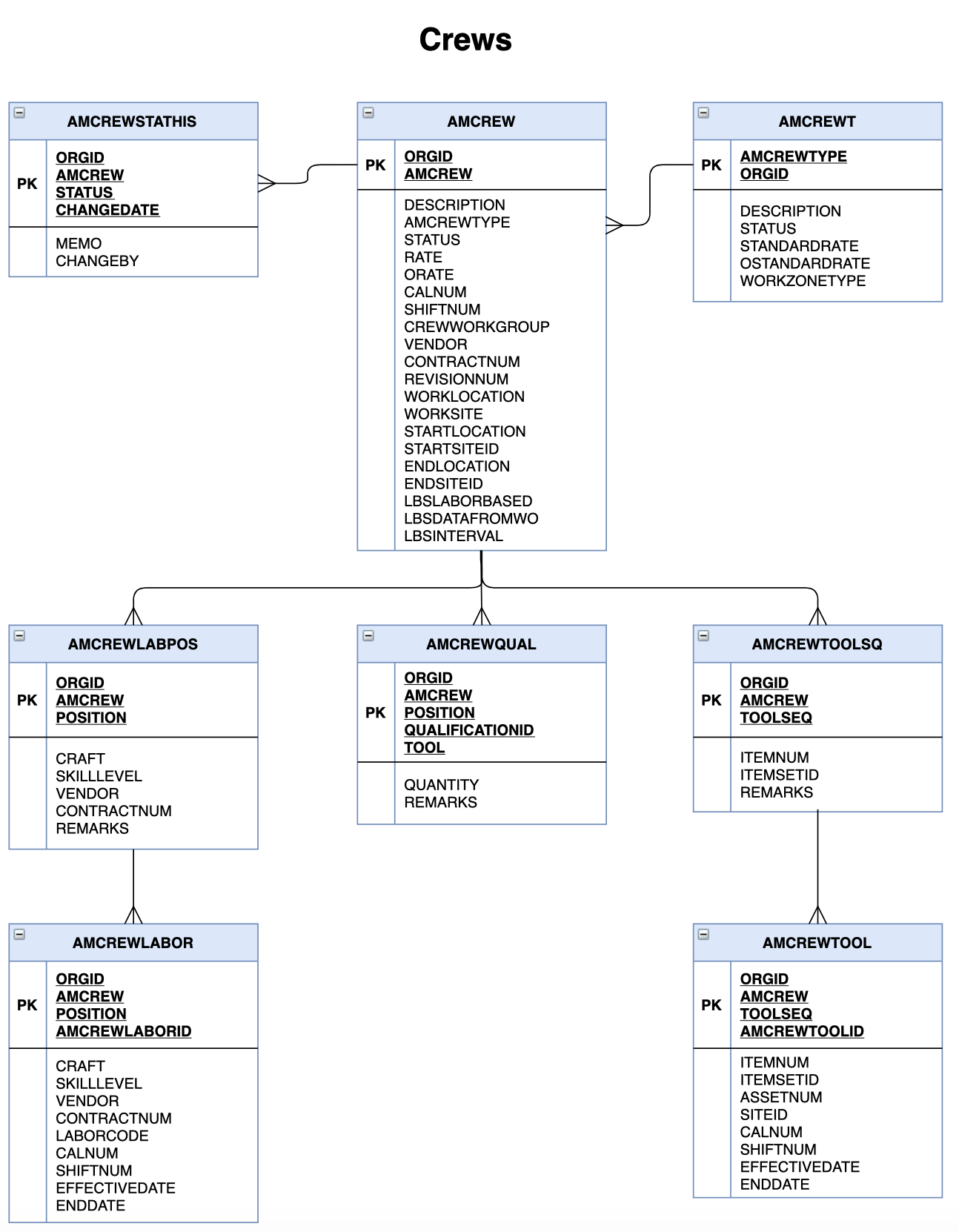
Crews (1 of 3) – Defining Crews
Read more: Crews (1 of 3) – Defining CrewsThe Crews application is too large for one article and so I will split it between: Defining Crews (this article) Crew Work Groups Assigning Labor and Tool Assets to Crews. I am also aiming to write other articles on the Graphical Crew Management application which is used in the daily shuffle of labor between crews,…
-

Crew Types
Read more: Crew TypesCrews originated in Maximo for Utilities and was introduced in Maximo Scheduler 7.5.1 and then rolled into core Maximo as part of Maximo 7.6. A crew is a group of Labor and Tool Assets that work together to complete work order assignments. A crew has one or more positions with required craft and skill levels…
-

Qualifications
Read more: QualificationsContents The Crafts application defines the maintenance disciplines and competency levels, referred to as Skill Levels in Maximo. Qualifications define the specialist skills and certifications that a person possesses that may help to decide between one Labor record or another when assigning work. A qualification can also be a requirement to use a tool or…
-

Crafts
Read more: CraftsContents Craft records are used to define disciplines that one or more employees or contractors possess, and which are used in the planning of work. Some traditional examples of crafts are Mechanic, Electrician, Plumber, Carpenter, but crafts are used in every industry, for example in IT, Deskside Support, Service Desk Tier 1, Service Desk Tier…
-

People – Modify Person Availability
Read more: People – Modify Person AvailabilityContents The Calendar does not define the availability of a labor or crew alone. With its shifts the calendar defines the work periods that would be considered working time from other periods in a day or week which would be considered non-working time. The calendar is designed to be shared between multiple labor or crews,…
-

Calendars
Read more: CalendarsContents In Maximo calendars are used on labor and crew resources, and on locations and assets to indicate operational periods. They are used with Service Level Agreements and there are also some hidden references to a calendar which you might discover if you attempted to delete a calendar. Calendars are fundamental to the Maximo Scheduler…
-
Maximo Application Maps (8 of 9) Resources
Read more: Maximo Application Maps (8 of 9) ResourcesThe Resources module is a sub-module of the Administration module. People A person is someone who is referenced in a Maximo application and a person record must be created before a labor or user record is created. A labor record is someone who is assigned and performs work. You can actually create a new person…

A site dedicated to Maximo containing over 385 articles, podcast episodes, YouTube videos, and quizzes, updated weekly, 900K words!