

Contents
The Operational Dashboard was first released in MAS 8.9 in November 2022, the Work Queue Manager first released in MAS 8.11 in September 2023, they have both been enhanced in each following release through to MAS 9.2. I first wrote about both in early 2024 and followed that up in September of the same year with the updates following the MAS 9.0 release. I am planning to write about the enhancements in MAS 9.1 and MAS 9.2, but I thought I would start with an overview because the question people ask me is – Is the Operational Dashboard a replacement for the Start Centers?
Overview as of MAS 9.0
The Operational Dashboard is like a Start Center but using new technology which can be leveraged into the future, the Start Center is old technology and is unlikely to be enhanced. A Work Queue is like a Result Set Portlet it is showing the results of a query, but it is more than this, for example you can perform actions on the records, and you can personalise the work queue with different columns, filters and sort criteria.
As of September 2024 (MAS 9.0) there were 10 different card types that you could configure onto a new dashboard, and dashboards could be added to Security Groups. It was not a replacement for a Start Center, there were Start Center portlets like Workflow Assignments, Bulletin Board and Report List that you could not add to a new Operational Dashboard and the Work Queues did not have a graphing capability or the ability to colour the records based on a criteria, like work order priority.
I created 7 IBM Ideas following my review and a further 10 after the release of MAS 9.1, I’ll give an update on these towards the end of this article.
In Summary (as of MAS 9.0)
Work Queue Manager:
- The application is based on the Maximo Application Framework, providing a modern user interface.
- The application will be found in the Administration module after granting access.
- You can create a work queue (wizard driven) that is public or restricted to one or more Person Groups.
- Work queues can only be created by administrators, but they can be personalised by a user.
- A work queue is based on an Object Structure and uses the OS queries or the queries in the launching application.
- The second step in the wizard allows you to select the fields to display and the order to display the fields.
- The third step in the wizard allows you to select actions that can be applied to the work queue.
- Active work queues can be added to an Operational Dashboard using the Work Queue card.
- You can select one or more records in the work queue and apply an action.
- You can filter columns, sort columns from the main object, personalise the column layout adding new columns or changing the column order, you can also download the result set to a spreadsheet.
The two articles I wrote are still relevant:
Work Queue Manager MAS 8.11 – https://maximosecrets.com/2024/02/27/work-queue-manager/
Work Queue Manager MAS 9.0 – https://maximosecrets.com/2024/09/09/work-queue-manager-mas-9-0/
Note. Most of the support cases were resolved by the time we got to MAS 9.1.
Operational Dashboard:
- There are two default Operational Dashboards, Maintenance Manager and one called Emissions Management, if you have HSE installed.
- There are actions to Create and Manage Dashboards, create a public dashboard or a private one. Public dashboards are added to security groups in the Security Groups application.
- There are 10 card types in the card gallery, KPI Trend, KPI Comparison, KPI Value, Value, Favourites, Quick Actions, Table, Work Queues, External Content, Threshold Tile. Some require a data source to be defined.
- Manage Dashboards has options for Edit, View and Delete.
- There are Security Group options for Read, Create Private Dashboard, Create Public Dashboard, Hide Public Dashboard and Delete Public Dashboard.
- You can duplicate a dashboard by using the Save As option.
The two articles I wrote are still relevant:
Operational Dashboard MAS 8.11 – https://maximosecrets.com/2024/03/01/operational-dashboard/
Operational Dashboard MAS 9.0 – https://maximosecrets.com/2024/09/23/operational-dashboard-mas-9-0/
I also created and published both a video script and a podcast script, but I never recorded either:
Operational Dashboard and Work Queues – Video Script – https://maximosecrets.com/2024/09/26/operational-dashboard-and-work-queues-2/
Operational Dashboard and Work Queues – Podcast Script – https://maximosecrets.com/2024/09/25/operational-dashboard-and-work-queues/
Enhancements in MAS 9.1
Work Queue Manager:
- You now have the ability to select fields from child objects in the object structure.
- A new work queue now defaults to Inactive state, and you need to make it active.
- You can now duplicate a work queue.
- An Add Members action allows you to add Person Groups to the work queue.
- The wizard was revamped – unfortunately you can no longer change the field order when using the Edit action (this has been reported to IBM Support).
- There are three standard work queues:
- DEF LABOR EXPIRING QUAL – Labor that has a qualification due to expire in the next 30 days.
- DEF MY WORK ORDERS – Work orders you own.
- DEF YDAYS INCOMPLETE WORK – Work orders that were scheduled to be completed yesterday.
Operational Dashboard:
- You can link a Work Queue to a KPI Value card. When selected you get an action in the card to Open Work Queue.
- The Work Queue card now has card options for Single Queue and Multiple Queues. The Single Queue option opens the specified work queue, like a Start Center Result Set. In previous versions (Multiple Queues) you were presented with the queue and a count of the number of records in the queue, and then you navigated to view the work queue.
- The Manage Dashboards dialog has a button to Manage Private Dashboards. This is added as a new signature option in Security Groups.
- The Quick Action card supports the selection of a ticket template when the action is ticket based.
- There are now multiple out of the box dashboards, Asset Manager (new in 9.1), Defect Management (new in 9.1), Emissions Management and Maintenance Manager. They all need to be selected in Security Groups. Emissions Management was converted to appxml format, any changes that were previously made will not be carried forward. A Preconfigured tab is added to the Card Gallery.
- The Workflow Card can now be added to another Operational Dashboard by selecting it from the Preconfigured tab – Maintenance Management, select Workflow Assignment Due Soon.
- When in Edit Mode the Card Gallery now shows the Card Type you are modifying.
- There was a merger of Health and Manage work queues and operational dashboards. The Asset Manager out of the box dashboard complements the new Assets and Locations application, this is the out of the box Health application in MAS 9.1. The Health work queues can be selected from the Work Queues card. When creating a new work queue select MXAPIASSET as Object Structure, the queries are prefixed RELENGINEER and the launch application is called RELENGINEER, the Assets and Locations application.
Enhancements in MAS 9.2
- A new field Display Name is added to the Actions application and is used in the Work Queue Manager when selecting actions. It is not displayed when the Work Queue is launched from the Operational Dashboard, a record is selected and the actions are displayed, there is no tool tip for the action.
Operational Dashboard
- The KPI Trend chart type now includes Line, Area Line, Grouped Bar, Stacked Bar and Scatter, in MAS 9.1 only Line was supported.
- The KPI Comparison and KPI Trend cards have ability to customise the KPI label. However, in KPI Trend you cannot modify it for the primary KPI (see Idea MASM-I-1937)
- A new Bulletin Board card is added to the Maintenance Management operational dashboard. To add it to another dashboard then select it from the Preconfigured tab – Maintenance Management, select Bulletin Board.
- The Single Work Queue can be displayed in table or chart form with chart types, Bar, Line or Pie. You can switch between table and chart, but you cannot switch the criteria by selecting a different work queue field or the chart type as you can in the Start Center Result Set portlet.
- Work Queue Client Actions can be defined in the Actions application and added to a work queue. One example is provided to change the owner on a work order. Potentially others can be developed using Controller JavaScripts in the app.xml, we will investigate this further. For example, it may be possible to create a Client Action to create a follow-up work order for a work order-based work queue.
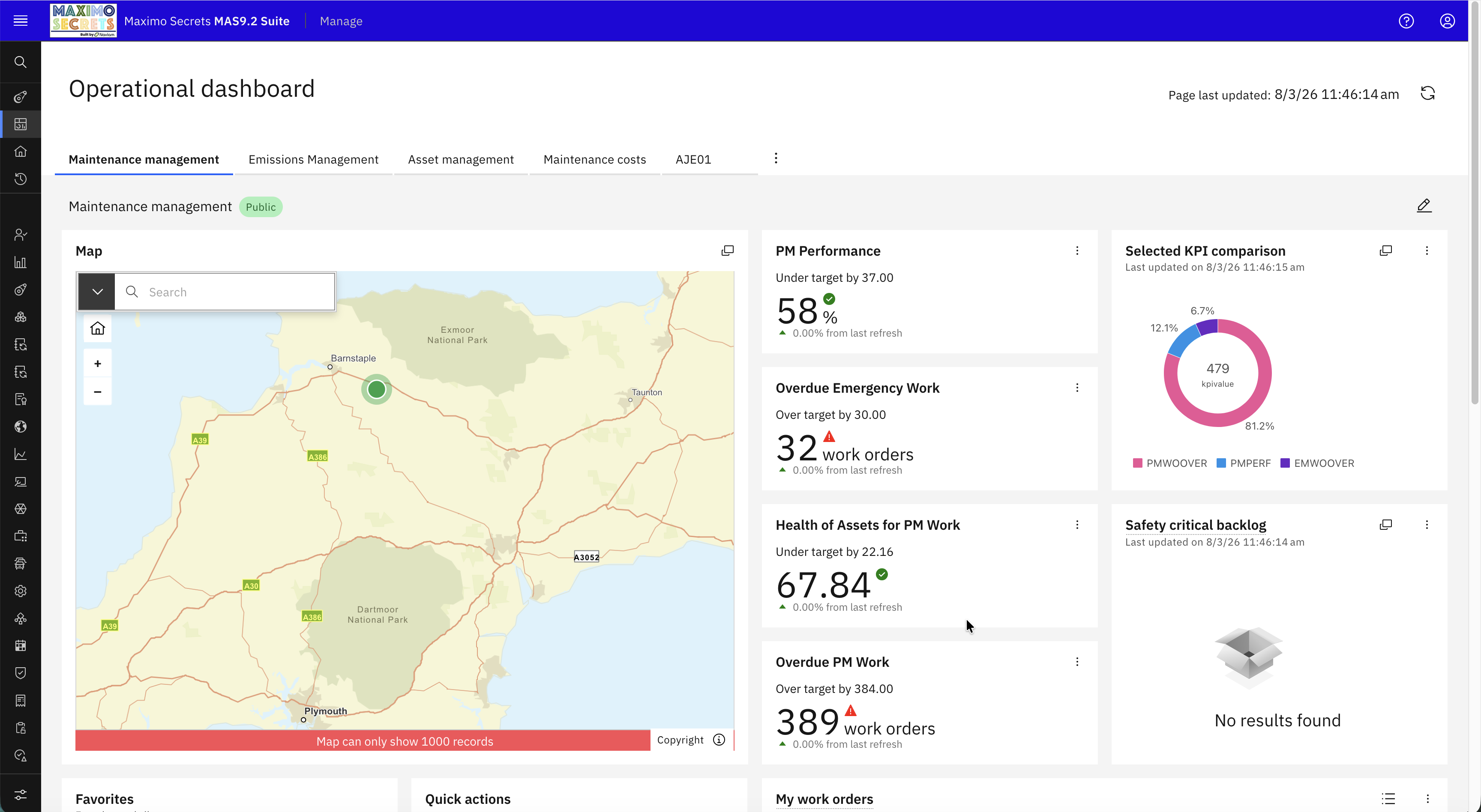
- A new Map card is provided that shows records from a Work Queue or a Data Source, the assumption is that this displays work orders or tickets with locationA physical place where assets exist and where work can be performed. More or asset data providing the geospatial position, but this needs investigating. Documentation suggests the map card supports multiple map layers and overlays.
- A new Gauge card is provided that shows data from a Data Source.
- The Maintenance Manager standard operational dashboard has been renamed Maintenance Management. It also has an example of a single work queue card and a work queue chart that can be switched to table format.
- The Asset Management (Health dashboard) has four alert cards to show a count of the number of open Urgent, High, Medium and Low priority alerts, there is an Alerts table below this. These are examples of Value and Table cards which use a data source.
- The My Work Orders tile can be copied from the Maintenance Management dashboard; it shows work orders assigned to the logged in user.
Operational Dashboard v’s Start Center
If we compare the Operational Dashboard against the Start Center what are the differences and can we conclude that the Operational Dashboard is a replacement for the Start Center in MAS 9.2?
The assumption is that the functionality documented works and that in reviewing these new features in MAS 9.1 and MAS 9.2, which I will do over the next few weeks, that there are not too many issues.


With MAS 9.2 you can say that the Operational Dashboards goes beyond what can be achieved with Start Centers. From the early days of Operational Dashboards there were differences, the KPI Trend card was introduced early, a trend is only possible to view in a Start Center by launching to the KPI Manager application, which is an administration application, and for many users this will not be accessible.
Some of the features available in MAS 9.2, the charting function for work queues, and the Bulletin Board card, will mean that many clients will start exploring the Operational Dashboards and Work Queues, if they have not done so already. For a new client starting out, the Operational Dashboards is probably now a better bet than investing time in developing Start Centers, I wouldn’t have said that about MAS 9.1 although I have recommended that existing clients start to use it in specific cases.
Is it a total replacement for Start Centers, the answer is no, there are still gaps. These have been registered as IBM Ideas (see below), some of which are Planned For Future Release, some of which like the Report List Card are currently Not Under Consideration. If these gaps are important to you, then please log in to the IBM Ideas portal and vote for them.
IBM Ideas for Operational Dashboards and Work Queues
Planned for Future Release
Work Queue – Set criteria to colour record text – https://ideas.ibm.com/ideas/MASM-I-1492
In order for the Operational Dashboard to be able to replace the Start Centers the Work Queue (which is similar to Result Set portlet) should have the ability to color the text of each record according to an attribute value. In the Result Set Portlet this is defined under Color Options.
The obvious example which could be used for demo data is to color work orders by WOPRIORITY 1-10. Maximo Scheduler defines these colors as System Properties skd.workorder.priority.1.background is the background colour for priority 1 (very low). As an alternative Scheduler also has System Properties for WO Status skd.workorder.comp.background
Work Queue – When using View Record and the work queue is based on the WORKVIEW object it should launch to the application defined in the WORKVIEW.APP attribute – https://ideas.ibm.com/ideas/MASM-I-1496
In order to replace the Start Centers with the Operational Dashboard a work queue when based on the WORKVIEW object (MXAPIWORKVIEW) should launch to the application defined in the APP attribute of the WORKVIEW object. A Start Center Result Set based on WORKVIEW does this. Currently it will launch to the WORKVIEW application which is an application in Administration module and many users will not have access to this.
The idea behind the Work View is that it is a single place where the owner of tickets and work orders can go to view the records they need to attend to. Whether originally intended (or not) it is significantly faster to query the WORKVIEW than WORKORDER or TICKET tables when those tables are highly populated, the WORKVIEW has far fewer attributes which aids the query execution time in databases. The WORKVIEW records are maintained by Maximo as standard when new work orders or tickets are created or updated.
Operational Dashboard – KPI Value Card – Linked Report – https://ideas.ibm.com/ideas/MASM-I-1493
In order for the Operational Dashboard to be able to replace the Start Centers the KPI Value card needs to be able to link to a Report. This is acting like a drilldown from the KPI to the details that make up the KPI. Noted. There is a link to Work Queue already which is a great addition.
Operational Dashboard – Work Queue card should be able to launch the application with the result set from the query. – https://ideas.ibm.com/ideas/MASM-I-1055
Currently you can navigate to the Launch application one record at a time from the screen that opens when the Work Queue is opened from the Operational Dashboard. There should be the ability to navigate to the application and perform the same query so that it fetches the same result set of records.
The Operation Dashboard is the equivalent of the Start Center and in a Result Set portlet you can navigate to the application with the same result set displayed in the List tab. It uses the button Open Result Set in the Application.
Under Review
Operational Dashboard – Work Queue Card – Chart – Ability to change the criteria on which the chart is displayed – https://ideas.ibm.com/ideas/MASM-I-1929
In order for the Operational Dashboard to replace the Start Centers the Work Queue Card in the Operational Dashboard should have the ability to change the criteria used for the chart. In a Start Center Result Set the field Display By Attribute is used to perform this function.
Operational Dashboard – KPI Value card – Link to another KPI – https://ideas.ibm.com/ideas/MASM-I-1930
In order for the Operational Dashboard to be able to replace the Start Centers the KPI Value Card should be able to link to another KPI using the existing Link to KPI attribute (KPIMAIN.LINKTO).
Submitted
Operational Dashboard, KPI Trend does not have the ability to add custom label to the main KPI – https://ideas.ibm.com/ideas/MASM-I-1937
In MAS 9.2 you can add a custom label to KPIs in KPI Comparison and KPI Trend and the custom label is reflected as the chart label. In the KPI Trend you can add the custom label to the KPIs that you will compare with the primary KPI, but you cannot add a custom label to the primary KPI itself.
Not Under Consideration
Apart from the first one in this section which is missing Start Center functionality, the others were ideas which I thought would be useful enhancements. If you do so, please vote for them.
Operational Dashboard Report List Card – https://ideas.ibm.com/ideas/MASM-I-1491
In order for the Operational Dashboard to replace the Start Centers there should be a Report List card. This shows a set of BIRT reports in the order defined for the card. You can then launch the BIRT report via its Request Page.
Work Queue Manager – Maintain Filtering and Sort after you return having navigated to a record – https://ideas.ibm.com/ideas/MASM-I-1169
The Work Queue provides a list of records which you can filter and sort. But when you navigate to an application, for example Work Order Tracking and when you use the breadcrumb or return to the work queue, the filtering and sorting is lost, and you are back on page 1.
The filtering, sorting and position in the work queue needs to be maintained to improve useability.
Work Queue Manager – a blue Update button should appear as soon as you make a change to an existing work queue – https://ideas.ibm.com/ideas/MASM-I-1178
If you have an existing work queue which you are modifying you need to navigate to the last page, Add Actions, before you can see the blue Update button, a bit annoying, it should appear straight away. Example, you would create a work queue and test that it works before adding a Person Group and testing the security. Person Group is on the first page, now I have to page through to the last page to save.
Operational Dashboard – Quick Action card to Create Work Order and apply a Job Plan – https://ideas.ibm.com/ideas/MASM-I-1497
The Quick Action card now has the ability in MAS 9.1 to apply a ticket template when creating a Service Request. It would be useful to also apply a Job Plan when creating a Work Order. This would be used for emergency/urgent work requiring a particular craft where raising a Service Request would not be the case.
Operational Dashboard – KPI Value card option View Trend – https://ideas.ibm.com/ideas/MASM-I-1494
The options in the KPI Value card when rendered would benefit from being able to see the KPI Trend (similar to what can be seen in KPI Trend card). An additional option to View in KPI Manager or View in KPI Viewer which many users would not be able to access because of security.