
-

Linear Assets (6) – Service Requests
Read more: Linear Assets (6) – Service RequestsContents This article shows how a linear asset is used in the Service Requests application, and in the Create/View Service Requests applications. Service Requests Application – Linear Segment Details If you are working on a linear asset in applications like Service Requests, Work Order Tracking, Preventive Maintenance, Routes or Condition Monitoring, the Linear Segment Details section will appear to…
-

Linear Assets (5) – Relationships
Read more: Linear Assets (5) – RelationshipsContents This article explores Relationships needed for linear assets and how they are used in the Relationships tab of the Assets application. Relationships Application Relationships Tab The Relationships application allows you to define a custom name to describe a relationship between assets or configuration items (CIs). The Use With field has the two options ASSET or CI. When the…
-
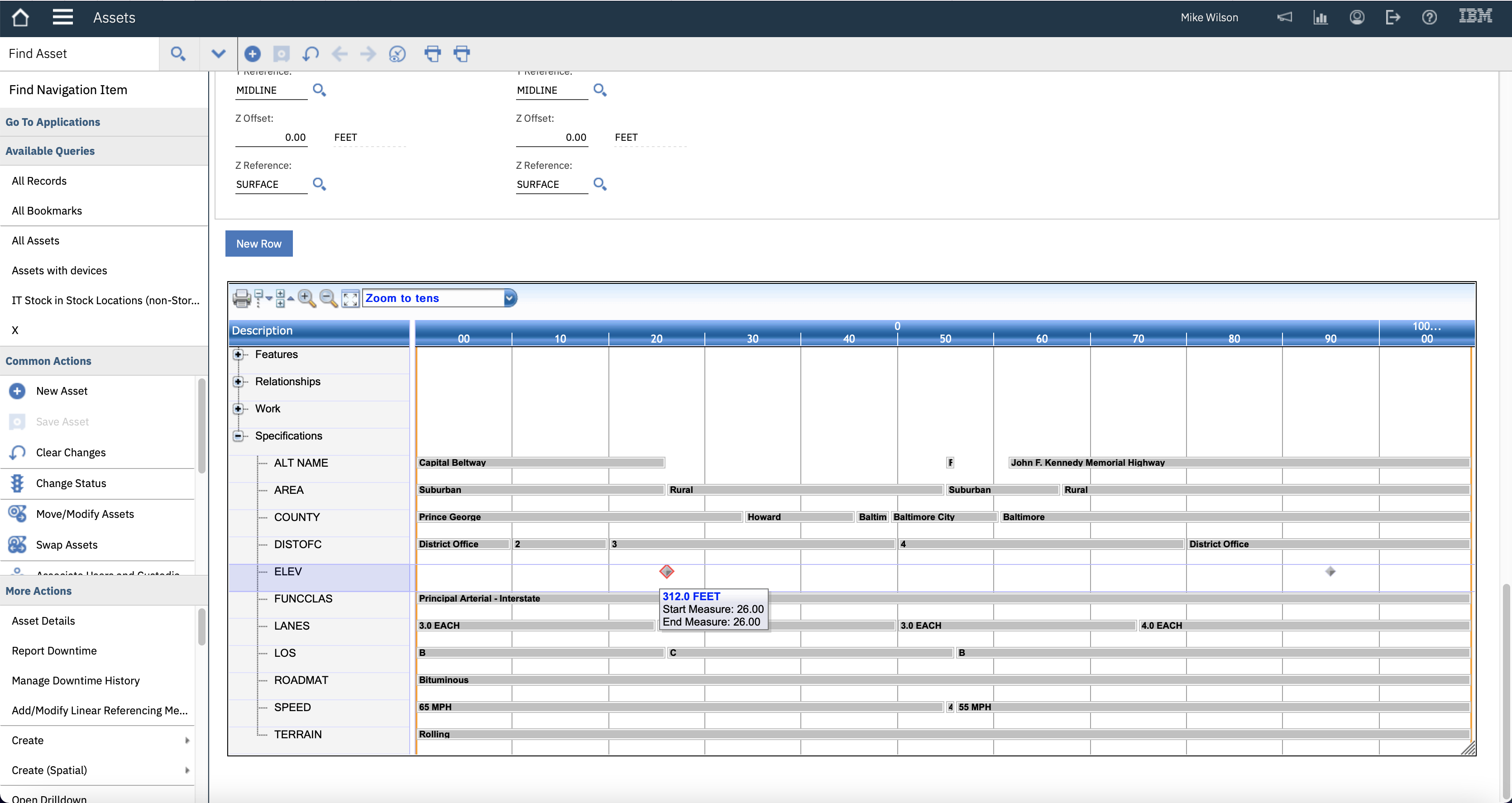
Linear Assets (4) – Asset Specifications
Read more: Linear Assets (4) – Asset SpecificationsContents This article explores the Specifications tab on the Assets application. Assets Application – Specifications Tab A linear asset can be classified, and the classification can have a set of attributes that describe the asset. For example, a road may have an attribute of road surface, number of lanes, or speed restrictions. For a linear asset the…
-

Linear Assets (3) – Asset Features
Read more: Linear Assets (3) – Asset FeaturesContents This article uses features on a linear asset in the Features tab on the Assets application and includes the asset feature’s specification Assets Application – Features tab With the features created you can now add them to the linear asset in the Features tab of the Assets application. I-95N has 12 asset features, 10 Mile Posts…
-

Linear Assets (2) – Features
Read more: Linear Assets (2) – FeaturesContents This article will take a reader through the Features application but will also describe some changes made in the Classifications application to support linear assets and features. Features A feature is a class of physical object that you will find along a linear asset. For example, along a road you will find mile posts, guard rails and overhead…
-

Linear Assets (1) – An Introduction
Read more: Linear Assets (1) – An IntroductionContents An Introduction to Linear Assets Linear is an add-on to Maximo in Maximo 7.6.x but becomes part of Maximo licensing when existing clients convert to AppPoints under a Maximo Application Suite license. Since v7.1 it has been a part of all Maximo installations but turned-on when a license key is applied. For a Maximo…
-
Repair Facilities
Read more: Repair FacilitiesWhat is a Repair Facility? Repair Facilities will most often be used when there are mobile assets that move between locations, for example trains, trucks and buses, boats and aeroplanes. The assets that belong to one site may be repaired at a location in another. In Maximo the work order is raised for the same…
-

Maximo Manage – Asset
Read more: Maximo Manage – AssetLearn about the applications in the Assets module
-
Inheriting Service Addresses
Read more: Inheriting Service AddressesLocations and assets can inherit their service address. The starting point is to define a location system as an Address System, this is performed using the action Manage Systems in the Locations application. Only one location system per site can be nominated as the address system and it must be a hierarchical system it cannot…
-
Service Address
Read more: Service AddressA Service Address is used to represent a physical location where labor or crews are sent to perform work. The ship to, bill to, or other types of address used in the Supply Chain applications are not service addresses, these are addresses defined in the Organizations application.

A site dedicated to Maximo containing over 385 articles, podcast episodes, YouTube videos, and quizzes, updated weekly, 900K words!