
-

Organizations settings affecting Inventory Usage
Read more: Organizations settings affecting Inventory UsageContents In the Organizations application there are a few settings that effect the behaviour in the Inventory Usage application. Transfer Options The Transfer Options action determines when you must transfer using the SHIPPED status. Across Organizations is the default, but you can choose Across Sites or All Transfers. This is a system wide setting. It…
-

Security in Inventory Usage
Read more: Security in Inventory UsageWhen you use the Inventory Usage application the storerooms that you have access to are dependent on your user security profile. How the application defaults the attributes in the header of a new record will also depend on your profile. This is best illustrated with an example. I have logged in as user HUNTER, navigated…
-

Inventory Usage statuses
Read more: Inventory Usage statusesContents The Inventory Usage records have the following statuses: Status Description ENTERED The default status when you insert a record in the Inventory Usage application STAGED Used when you have collected the items from the storeroom bins, and they are ready to be issued or transferred. They exist in a staging bin. You cannot move…
-

Inventory Usage – An overview
Read more: Inventory Usage – An overviewThe Inventory Usage application exists in the Inventory module and is used for issuing, returning and transferring items and tool items within site or across sites that share the same item master. It is an application that was introduced with Maximo 7.5 along with the Shipment Receiving application, the two together replaced the Issues and…
-
Financial Processes in Inventory (7 of 8)
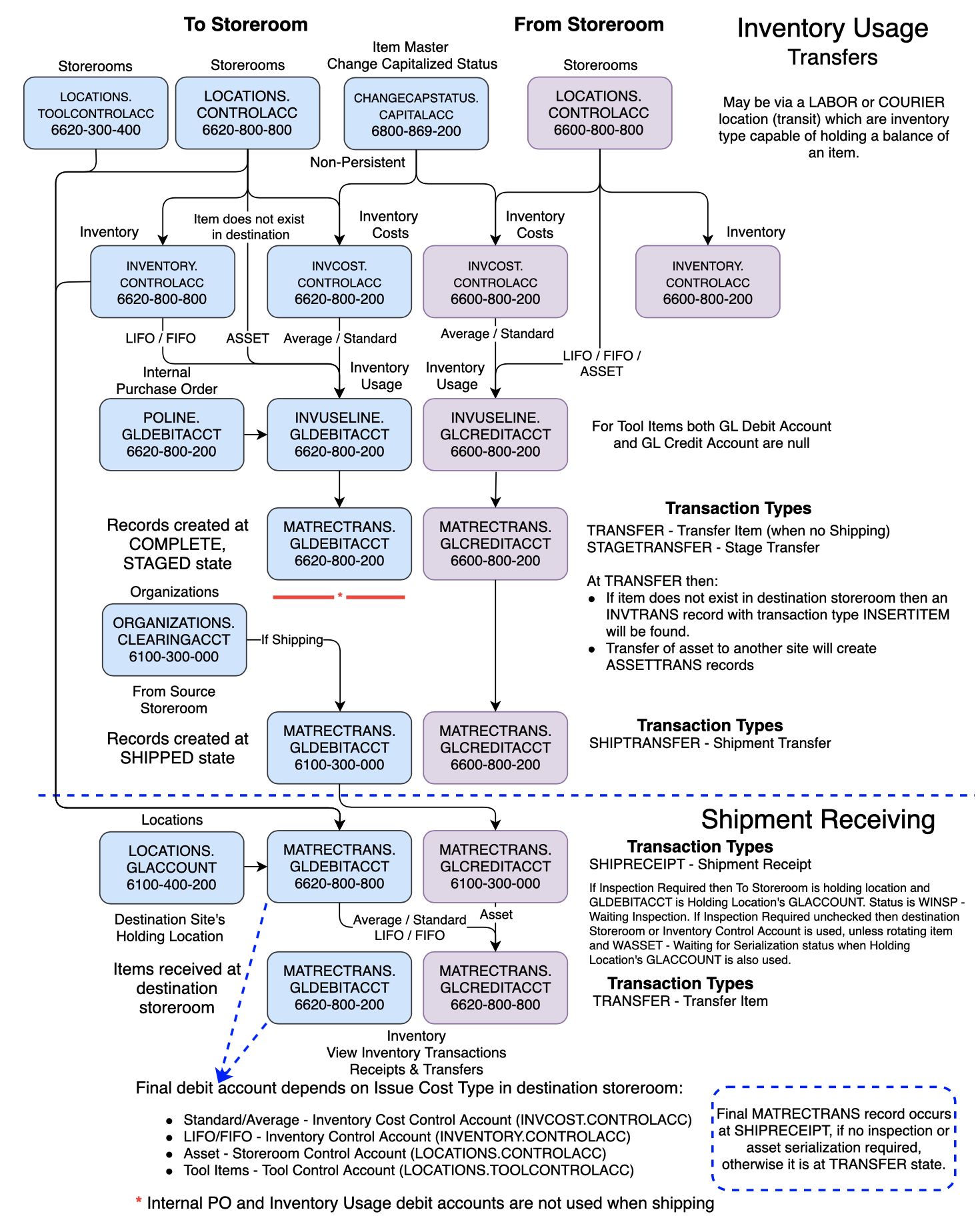
Read more: Financial Processes in Inventory (7 of 8)Contents This is the seventh in a series of pages that examine the financial processes in the applications of the Inventory module. They demonstrate, using examples and screenshots, how the debit and credit GL account fields are derived. A summary is provided at the end of each page. This series will include: This page will…
-

Financial Processes in Inventory (5 of 8)
Read more: Financial Processes in Inventory (5 of 8)Contents This is the fifth in a series of pages that examine the financial processes in the applications of the Inventory module. They demonstrate, using examples and screenshots, how the debit and credit GL account fields are derived. A summary is provided at the end of each page. This series will include: This page will…
-

Financial Processes in Inventory (3 of 8)
Read more: Financial Processes in Inventory (3 of 8)Contents This is the third in a series of pages that examine the financial processes in the applications of the Inventory module. They demonstrate, using examples and screenshots, how the debit and credit GL account fields are derived. A summary is provided at the end of each page. This series will include: This page will…
-

Financial Processes in Inventory (2 of 8)
Read more: Financial Processes in Inventory (2 of 8)Contents This is the second in a series of pages that examine the financial processes in the applications of the Inventory module. They demonstrate, using examples and screenshots, how the debit and credit GL account fields are derived. A summary is provided at the end of each page. This series will include: This page will…
-

Financial Processes in Inventory (1 of 8)
Read more: Financial Processes in Inventory (1 of 8)Contents Financial transaction records have attributes for both the debit and credit GL accounts, the fields GLDEBITACCT and GLCREDITACCT. In the Inventory module the main financial transactions occur as part of inventory adjustments (INVTRANS), issues and returns (MATUSETRANS), and transfers between storerooms (MATRECTRANS), but there are other events that write to these tables, for example…
-
“To tool, or not to tool? That is the question.”
Read more: “To tool, or not to tool? That is the question.”A tool is something used to service an asset, it is not a spare part or materials, they are items. A Tool is a type of item. It has two supporting applications Tools and Stocked Tools which look similar to Item Master and Inventory applications which are used with the Item type. Tools and Items…

A site dedicated to Maximo containing over 385 articles, podcast episodes, YouTube videos, and quizzes, updated weekly, 900K words!